
### Building a Library Management System with Python and Tkinter
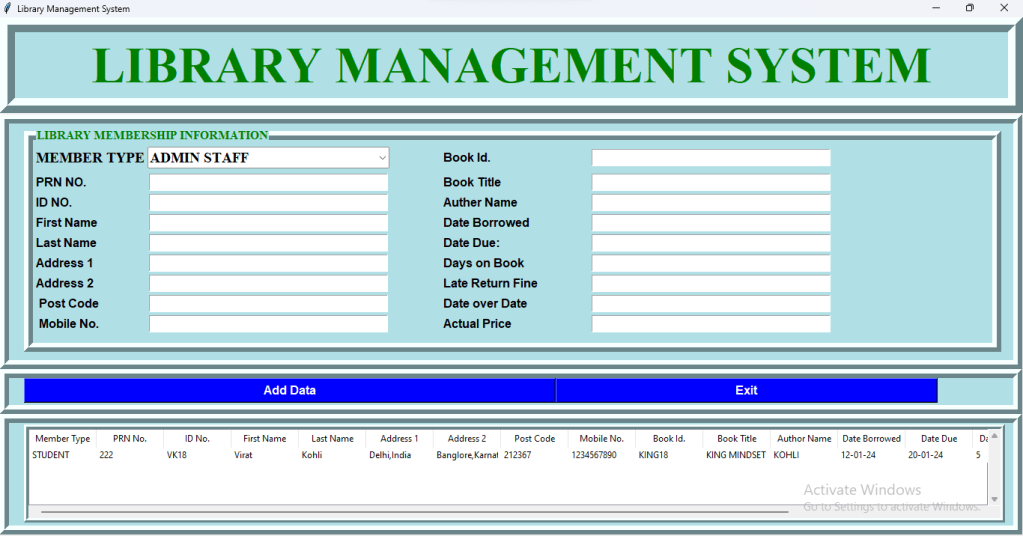
In this blog post, I’ll walk you through a project I recently completed—a Library Management System built using Python and the Tkinter library. This system is designed to manage library records efficiently, allowing users to add, view, and organize information related to library members and books.
#### Project Overview
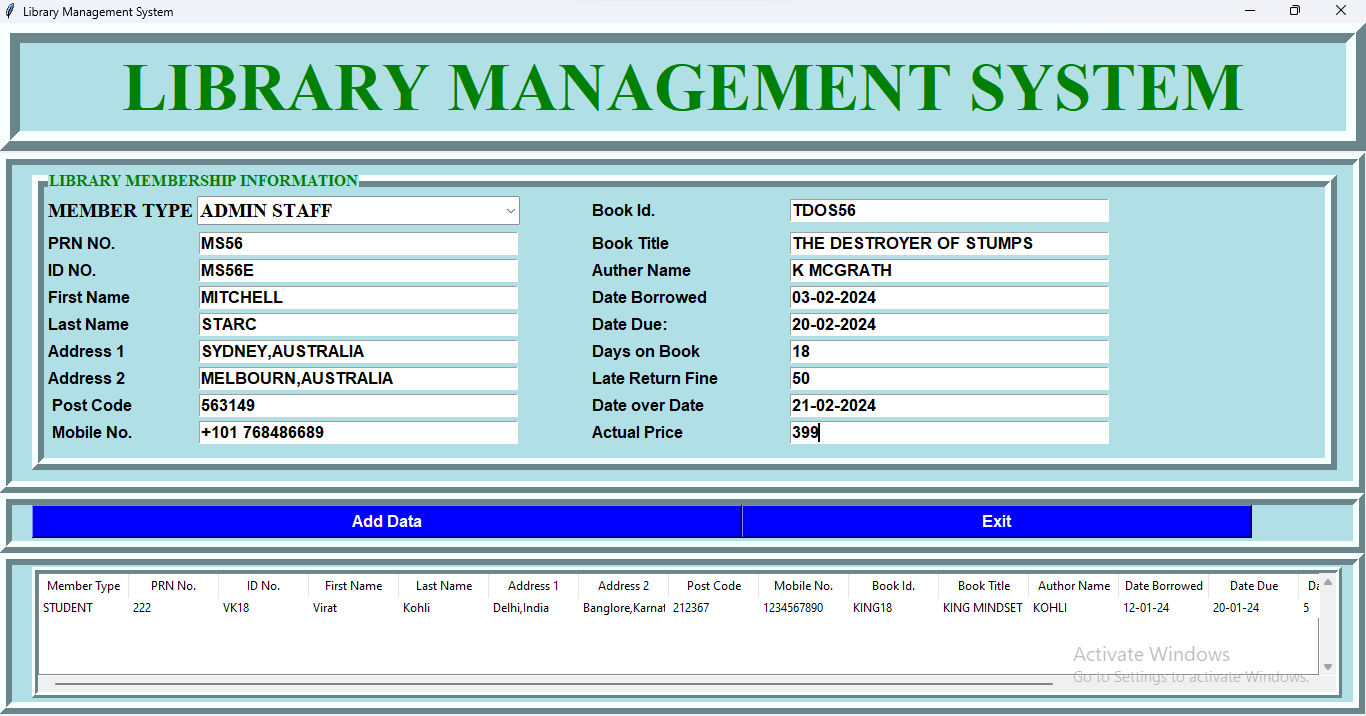
The Library Management System features a user-friendly interface where admins can manage all aspects of library records. It includes fields for member details like name, address, and contact information, as well as book-specific data such as title, author, and borrow/return dates.
#### Key Features
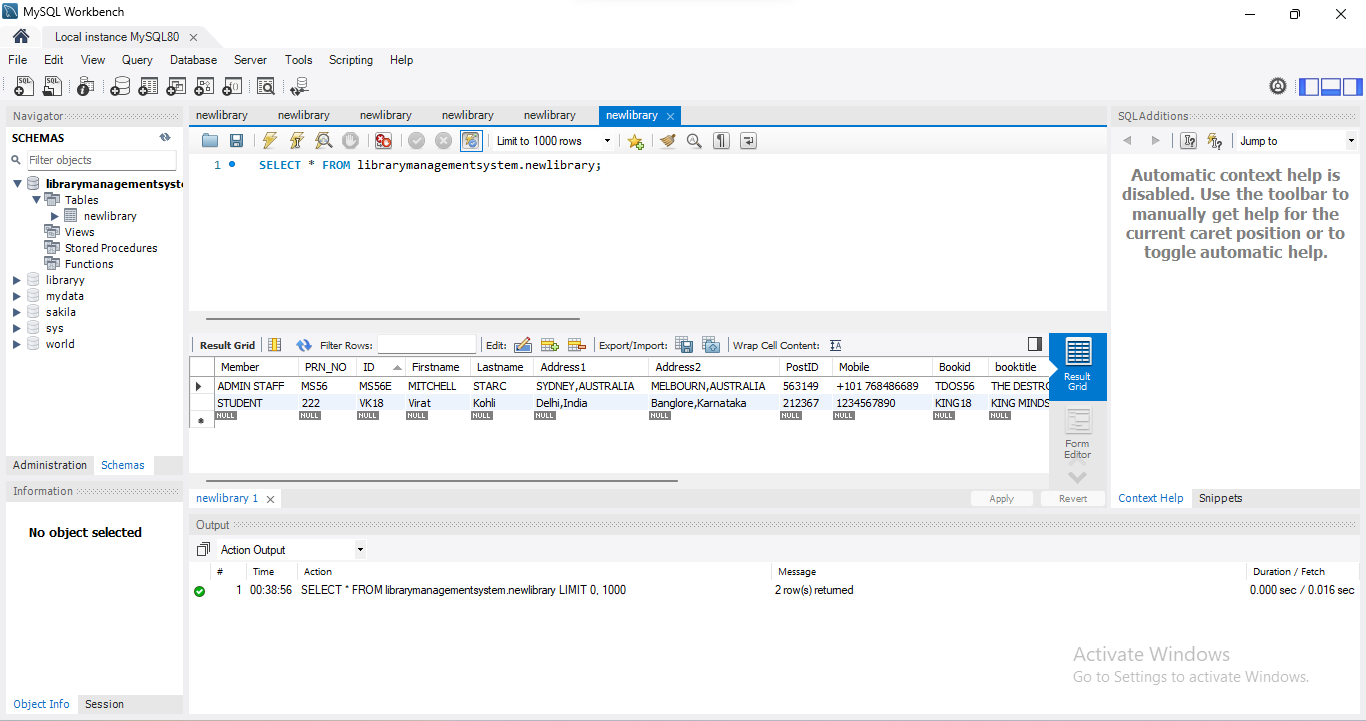
– **Data Entry:** Users can easily add new members and books to the system. Each entry is stored securely in a MySQL database, ensuring data integrity and easy retrieval.
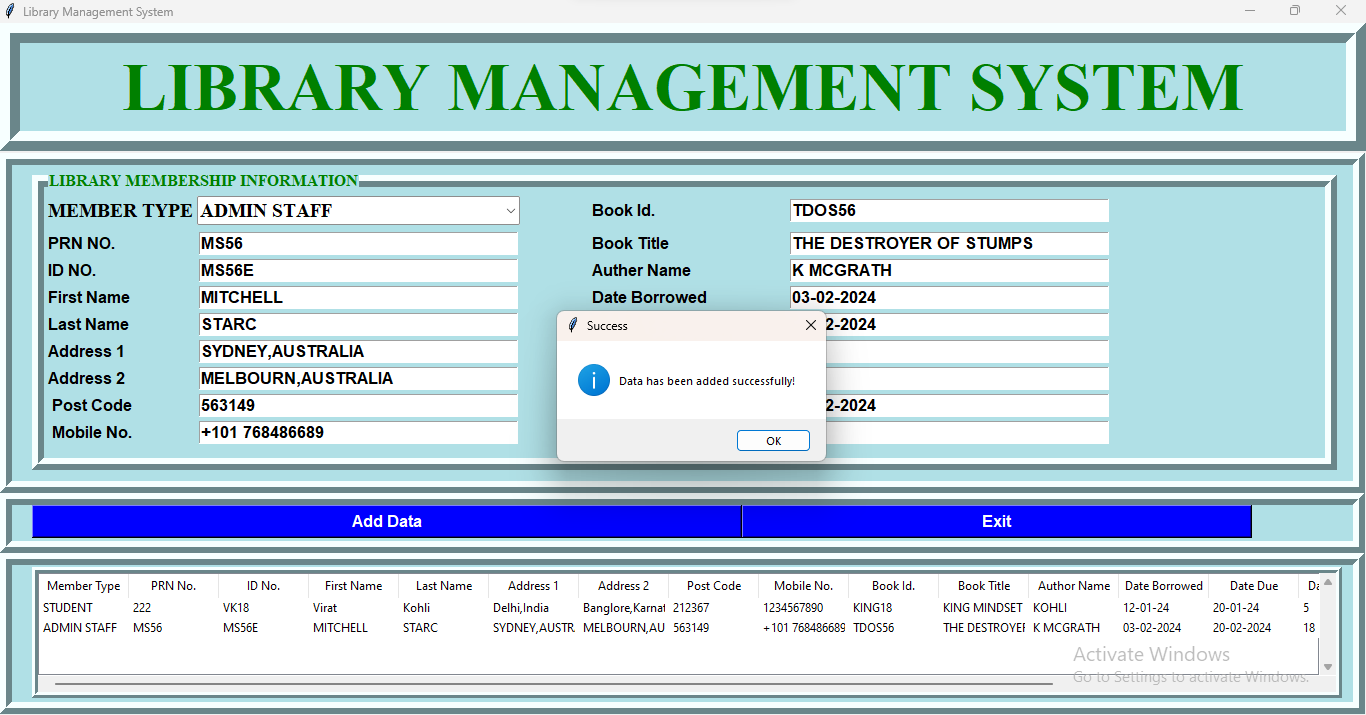
– **Data Management:** The system fetches data from the database and displays it in a clean, tabular format using the Tkinter Treeview widget. This makes it simple to browse through records.
– **User Interaction:** The system provides feedback through various message boxes, ensuring that users are always informed of successful operations or potential errors.
– **Exit Prompt:** A user-friendly exit prompt is included to confirm if the user really wants to close the application, adding a layer of protection against accidental data loss.
#### Technical Details
– **Backend:** MySQL database is used to store and manage the data. Python’s `pymysql` library handles database connections and operations.
– **Frontend:** The Tkinter library is utilized for the graphical user interface (GUI). The interface is designed to be simple yet effective, with responsive buttons and well-organized entry fields.
– **Code Structure:** The code is structured into a class, making it easy to manage different components of the application and ensuring that the application is scalable for future enhancements.
#### Conclusion
This project was a great learning experience in combining Python’s capabilities with database management and GUI design. Whether you’re a student, an educator, or just someone interested in software development, building a project like this can significantly enhance your coding skills.
Stay tuned for more updates and enhancements to this project. Feel free to share your thoughts or suggestions in the comments below!
—

from tkinter import *
from tkinter import ttk, messagebox
import pymysql as py
class LibraryManagementSystem:
def __init__(self, root):
self.root = root
self.root.title(“Library Management System”)
self.root.geometry(“1400×700+0+0”)
self.member_var = StringVar()
self.prn_var = StringVar()
self.id_var = StringVar()
self.firstname_var = StringVar()
self.lastname_var = StringVar()
self.address1_var = StringVar()
self.address2_var = StringVar()
self.postcode_var = StringVar()
self.mobile_var = StringVar()
self.bookid_var = StringVar()
self.booktitle_var = StringVar()
self.auther_var = StringVar()
self.dateborrowed_var = StringVar()
self.datedue_var = StringVar()
self.daysonbook = StringVar()
self.lateratefine_var = StringVar()
self.dateoverdue = StringVar()
self.finallprice = StringVar()
lbltitle = Label(self.root, text=”LIBRARY MANAGEMENT SYSTEM”, bg=”powder blue”, fg=”green”, bd=20, relief=”ridge”, font=(“Times New Roman”, 50, “bold”), padx=2, pady=6)
lbltitle.pack(side=TOP, fill=X)
frame = Frame(self.root, bd=12, relief=”ridge”, padx=20, bg=”powder blue”)
frame.place(x=0, y=130, width=1365, height=340)
# DATA FRAME LEFT
DataFrameLeft = LabelFrame(frame, text=”LIBRARY MEMBERSHIP INFORMATION”, bg=”powder blue”, fg=”green”, bd=12, relief=”ridge”, font=(“Times New Roman”, 12, “bold”))
DataFrameLeft.place(x=0, y=5, width=1305, height=300)
lblmember = Label(DataFrameLeft, bg=”powder blue”, text=”MEMBER TYPE”, font=(“Times New Roman”, 15, “bold”), padx=2, pady=6)
lblmember.grid(row=0, column=0, sticky=W)
comMember = ttk.Combobox(DataFrameLeft, font=(“Times New Roman”, 15, “bold”), width=30, textvariable=self.member_var, state=”readonly”)
comMember[“value”] = (“ADMIN STAFF”, “STUDENT”, “LECTURER”)
comMember.current(0)
comMember.grid(row=0, column=1)
lblPRN_no = Label(DataFrameLeft, font=(“arial”, 12, “bold”), text=”PRN NO.”, padx=2, pady=2, bg=”powder blue”)
lblPRN_no.grid(row=1, column=0, sticky=W)
textPRN_no = Entry(DataFrameLeft, font=(“arial”, 13, “bold”), textvariable=self.prn_var, width=35)
textPRN_no.grid(row=1, column=1)
lblTitle = Label(DataFrameLeft, font=(“arial”, 12, “bold”), text=”ID NO.”, padx=2, pady=2, bg=”powder blue”)
lblTitle.grid(row=2, column=0, sticky=W)
textTitle = Entry(DataFrameLeft, font=(“arial”, 13, “bold”), textvariable=self.id_var, width=35)
textTitle.grid(row=2, column=1)
lblFirstName = Label(DataFrameLeft, font=(“arial”, 12, “bold”), text=”First Name”, padx=2, pady=2, bg=”powder blue”)
lblFirstName.grid(row=3, column=0, sticky=W)
textFirstName = Entry(DataFrameLeft, font=(“arial”, 13, “bold”), textvariable=self.firstname_var, width=35)
textFirstName.grid(row=3, column=1)
lblLastName = Label(DataFrameLeft, font=(“arial”, 12, “bold”), text=”Last Name”, padx=2, pady=2, bg=”powder blue”)
lblLastName.grid(row=4, column=0, sticky=W)
textLastName = Entry(DataFrameLeft, font=(“arial”, 13, “bold”), textvariable=self.lastname_var, width=35)
textLastName.grid(row=4, column=1)
lblAddress1 = Label(DataFrameLeft, font=(“arial”, 12, “bold”), text=”Address 1″, padx=2, pady=2, bg=”powder blue”)
lblAddress1.grid(row=5, column=0, sticky=W)
textAddress1 = Entry(DataFrameLeft, font=(“arial”, 13, “bold”), textvariable=self.address1_var, width=35)
textAddress1.grid(row=5, column=1)
lblAddress2 = Label(DataFrameLeft, font=(“arial”, 12, “bold”), text=”Address 2″, padx=2, pady=2, bg=”powder blue”)
lblAddress2.grid(row=6, column=0, sticky=W)
textAddress2 = Entry(DataFrameLeft, font=(“arial”, 13, “bold”), textvariable=self.address2_var, width=35)
textAddress2.grid(row=6, column=1)
lblPostcode = Label(DataFrameLeft, font=(“arial”, 12, “bold”), text=” Post Code”, padx=2, pady=2, bg=”powder blue”)
lblPostcode.grid(row=7, column=0, sticky=W)
textPostcode = Entry(DataFrameLeft, font=(“arial”, 13, “bold”), textvariable=self.postcode_var, width=35)
textPostcode.grid(row=7, column=1)
lblMobile = Label(DataFrameLeft, font=(“arial”, 12, “bold”), text=” Mobile No.”, padx=2, pady=2, bg=”powder blue”)
lblMobile.grid(row=8, column=0, sticky=W)
textMobile = Entry(DataFrameLeft, font=(“arial”, 13, “bold”), textvariable=self.mobile_var, width=35)
textMobile.grid(row=8, column=1)
lblBookid = Label(DataFrameLeft, font=(“arial”, 12, “bold”), text=”Book Id.”, padx=70, pady=2, bg=”powder blue”)
lblBookid.grid(row=0, column=2, sticky=W)
textBookid = Entry(DataFrameLeft, font=(“arial”, 13, “bold”), textvariable=self.bookid_var, width=35)
textBookid.grid(row=0, column=3)
lblBooktitle = Label(DataFrameLeft, font=(“arial”, 12, “bold”), text=”Book Title”, padx=70, pady=2, bg=”powder blue”)
lblBooktitle.grid(row=1, column=2, sticky=W)
textBooktitle = Entry(DataFrameLeft, font=(“arial”, 13, “bold”), textvariable=self.booktitle_var, width=35)
textBooktitle.grid(row=1, column=3)
lblAuther = Label(DataFrameLeft, font=(“arial”, 12, “bold”), text=”Auther Name”, padx=70, pady=2, bg=”powder blue”)
lblAuther.grid(row=2, column=2, sticky=W)
textAuther = Entry(DataFrameLeft, font=(“arial”, 13, “bold”), textvariable=self.auther_var, width=35)
textAuther.grid(row=2, column=3)
lblDateBorrowed = Label(DataFrameLeft, font=(“arial”, 12, “bold”), text=”Date Borrowed “, padx=70, pady=2, bg=”powder blue”)
lblDateBorrowed.grid(row=3, column=2, sticky=W)
textDateBorrowed = Entry(DataFrameLeft, font=(“arial”, 13, “bold”), textvariable=self.dateborrowed_var, width=35)
textDateBorrowed.grid(row=3, column=3)
lblDateDue = Label(DataFrameLeft, font=(“arial”, 12, “bold”), text=”Date Due: “, padx=70, pady=2, bg=”powder blue”)
lblDateDue.grid(row=4, column=2, sticky=W)
textDateDue = Entry(DataFrameLeft, font=(“arial”, 13, “bold”), textvariable=self.datedue_var, width=35)
textDateDue.grid(row=4, column=3)
lblDaysonBook = Label(DataFrameLeft, font=(“arial”, 12, “bold”), text=”Days on Book”, padx=70, pady=2, bg=”powder blue”)
lblDaysonBook.grid(row=5, column=2, sticky=W)
textDaysonBook = Entry(DataFrameLeft, font=(“arial”, 13, “bold”), textvariable=self.daysonbook, width=35)
textDaysonBook.grid(row=5, column=3)
lbllateretuenfine = Label(DataFrameLeft, font=(“arial”, 12, “bold”), text=”Late Return Fine”, padx=70, pady=2, bg=”powder blue”)
lbllateretuenfine.grid(row=6, column=2, sticky=W)
textlateretuenfine = Entry(DataFrameLeft, font=(“arial”, 13, “bold”), textvariable=self.lateratefine_var, width=35)
textlateretuenfine.grid(row=6, column=3)
lblDateoverDate = Label(DataFrameLeft, font=(“arial”, 12, “bold”), text=”Date over Date”, padx=70, pady=2, bg=”powder blue”)
lblDateoverDate.grid(row=7, column=2, sticky=W)
textDateoverDate = Entry(DataFrameLeft, font=(“arial”, 13, “bold”), textvariable=self.dateoverdue, width=35)
textDateoverDate.grid(row=7, column=3)
lblActualPrice = Label(DataFrameLeft, font=(“arial”, 12, “bold”), text=”Actual Price”, padx=70, pady=2, bg=”powder blue”)
lblActualPrice.grid(row=8, column=2, sticky=W)
textActualPrice = Entry(DataFrameLeft, font=(“arial”, 13, “bold”), textvariable=self.finallprice, width=35)
textActualPrice.grid(row=8, column=3)
# BUTTONS
Framebutton = Frame(self.root, bd=12, relief=”ridge”, padx=20, bg=”powder blue”)
Framebutton.place(x=0, y=470, width=1365, height=60)
btnAddData = Button(Framebutton, command=self.add_data, text=”Add Data”, font=(“arial”, 12, “bold”), width=70, bg=”blue”, fg=”white”)
btnAddData.grid(row=0, column=0)
btnExit = Button(Framebutton, command=self.exit_app, text=”Exit”, font=(“arial”, 12, “bold”), width=50, bg=”blue”, fg=”white”)
btnExit.grid(row=0, column=1)
# INFORMATION FRAME
FrameDetails = Frame(self.root, bd=12, relief=”ridge”, padx=20, bg=”powder blue”)
FrameDetails.place(x=0, y=530, width=1365, height=161)
Table_frame = Frame(FrameDetails, bd=6, relief=”ridge”, bg=”powderblue”)
Table_frame.place(x=0, y=2, width=1310, height=131)
xscroll = Scrollbar(Table_frame, orient=HORIZONTAL)
yscroll = Scrollbar(Table_frame, orient=VERTICAL)
self.Library_table = ttk.Treeview(Table_frame, column=(“Member Type”, “PRN No.”, “ID No.”, “First Name”, “Last Name”, “Address 1”, “Address 2”, “Post Code”, “Mobile No.”, “Book Id.”, “Book Title”, “Author Name”, “Date Borrowed”, “Date Due”, “Days on Book”, “Late Return Fine”, “Date Overdue”, “Actual Price”),
xscrollcommand=xscroll.set, yscrollcommand=yscroll.set)
xscroll.pack(side=BOTTOM, fill=X)
yscroll.pack(side=RIGHT, fill=Y)
xscroll.config(command=self.Library_table.xview)
yscroll.config(command=self.Library_table.yview)
self.Library_table.heading(“Member Type”, text=”Member Type”)
self.Library_table.heading(“PRN No.”, text=”PRN No.”)
self.Library_table.heading(“ID No.”, text=”ID No.”)
self.Library_table.heading(“First Name”, text=”First Name”)
self.Library_table.heading(“Last Name”, text=”Last Name”)
self.Library_table.heading(“Address 1″, text=”Address 1”)
self.Library_table.heading(“Address 2″, text=”Address 2”)
self.Library_table.heading(“Post Code”, text=”Post Code”)
self.Library_table.heading(“Mobile No.”, text=”Mobile No.”)
self.Library_table.heading(“Book Id.”, text=”Book Id.”)
self.Library_table.heading(“Book Title”, text=”Book Title”)
self.Library_table.heading(“Author Name”, text=”Author Name”)
self.Library_table.heading(“Date Borrowed”, text=”Date Borrowed”)
self.Library_table.heading(“Date Due”, text=”Date Due”)
self.Library_table.heading(“Days on Book”, text=”Days on Book”)
self.Library_table.heading(“Late Return Fine”, text=”Late Return Fine”)
self.Library_table.heading(“Date Overdue”, text=”Date Overdue”)
self.Library_table.heading(“Actual Price”, text=”Actual Price”)
self.Library_table[‘show’] = ‘headings’
self.Library_table.column(“Member Type”, width=90)
self.Library_table.column(“PRN No.”, width=90)
self.Library_table.column(“ID No.”, width=90)
self.Library_table.column(“First Name”, width=90)
self.Library_table.column(“Last Name”, width=90)
self.Library_table.column(“Address 1”, width=90)
self.Library_table.column(“Address 2”, width=90)
self.Library_table.column(“Post Code”, width=90)
self.Library_table.column(“Mobile No.”, width=90)
self.Library_table.column(“Book Id.”, width=90)
self.Library_table.column(“Book Title”, width=90)
self.Library_table.column(“Author Name”, width=90)
self.Library_table.column(“Date Borrowed”, width=90)
self.Library_table.column(“Date Due”, width=90)
self.Library_table.column(“Days on Book”, width=90)
self.Library_table.column(“Late Return Fine”, width=90)
self.Library_table.column(“Date Overdue”, width=90)
self.Library_table.column(“Actual Price”, width=90)
self.fetch_data()
self.Library_table.pack(fill=BOTH, expand=1)
def add_data(self):
conn = py.connect(host=”localhost”, user=”root”, password=”LFCOMP@105″, database=”librarymanagementsystem”)
my_cursor = conn.cursor()
try:
query = “INSERT INTO newlibrary VALUES (%s, %s, %s, %s, %s, %s, %s, %s, %s, %s, %s, %s, %s, %s, %s, %s, %s, %s)”
values = (
self.member_var.get(), self.prn_var.get(), self.id_var.get(), self.firstname_var.get(),
self.lastname_var.get(), self.address1_var.get(), self.address2_var.get(),
self.postcode_var.get(), self.mobile_var.get(), self.bookid_var.get(), self.booktitle_var.get(),
self.auther_var.get(), self.dateborrowed_var.get(), self.datedue_var.get(),
self.daysonbook.get(), self.lateratefine_var.get(), self.dateoverdue.get(), self.finallprice.get()
)
my_cursor.execute(query, values)
# Commit the changes to the database
conn.commit()
print(“Record inserted successfully!”)
self.fetch_data()
except Exception as e:
# Handle any exceptions that may occur during the execution
print(f”Error: {e}”)
# Rollback the changes in case of an error
conn.rollback()
finally:
# Close the database connection
conn.close()
messagebox.showinfo(“Success”, “Data has been added successfully!”)
def fetch_data(self):
conn = py.connect(host=”localhost”, user=”root”, password=”LFCOMP@105″, database=”librarymanagementsystem”)
my_cursor = conn.cursor()
my_cursor.execute(“select * from newlibrary”)
rows = my_cursor.fetchall()
if len(rows) != 0:
self.Library_table.delete(*self.Library_table.get_children())
for i in rows:
self.Library_table.insert(“”, END, values=i)
conn.commit()
conn.close
def exit_app(self):
exit_prompt = messagebox.askyesno(“Library Management System”, “Do you want to exit?”)
if exit_prompt > 0:
self.root.destroy()
if __name__ == “__main__”:
root = Tk()
obj = LibraryManagementSystem(root)
root.mainloop()
 Mohammad Sarfraj